Your Laptop Sounds Like a Jet Engine. A Clean Fan Fixes That.
The cause is almost never the fan — it's the blanket of dust packed around the heatsink. A 30-minute clean with three cheap tools returns a laptop to library-silent.
By Tom Okafor7 min read
On this page
Every laptop fan eventually announces itself — a thin whine at first, then a full turbine impression the moment you open a video call. The cause is almost never the fan's motor. It is the blanket of dust and felted lint that has been packing itself around the heatsink since the day you unboxed the machine. Cooling air cannot pass, the processor throttles and then panics, and the fan screams at maximum trying to move heat through a wall. Cleaning that wall is a thirty-minute job that returns a laptop to library-silent.
You need three things: a small Phillips driver for the bottom panel, a can of compressed air, and — the item that separates a cleaning from a repair — a soft brush. Everything else is patience.
The Safe Open
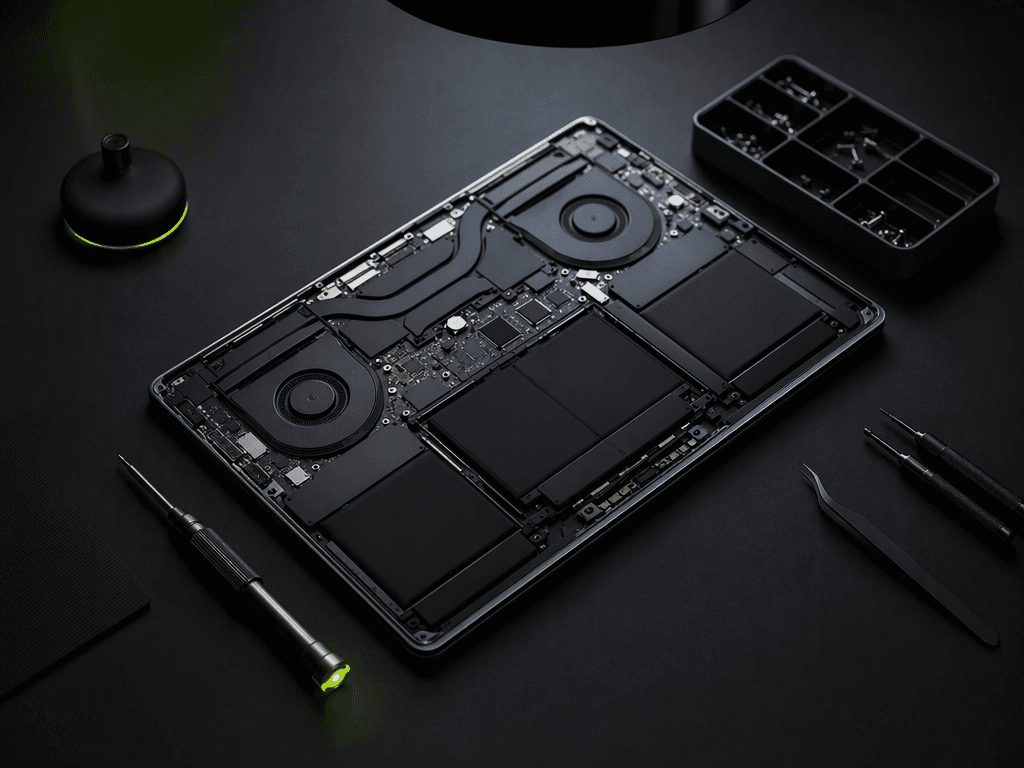
Power down fully, unplug, and ground yourself on a metal tap before touching anything inside. Remove the bottom panel screws, noting that one or two are frequently longer than the rest — keep them in a line in the order they came out. The panel pops free with a plastic pick run along the seam. What you see next startles every first-timer: a uniform felt of grey lint pressed between the fan and the heatsink fins, dense as a dryer filter. That is the entire problem.
Hold the fan blades still with a fingertip while you blow — letting a fan overspin from compressed air generates small voltages backwards through the board, a rare but real way to turn a cleaning into a parts order. Short bursts, fan braced, work the lint out along the direction of the fins rather than deeper into them.
The Thermal Paste Question
You will see dried, chalky thermal paste between the processor and its heatsink, and you will be tempted. Our advice: for a machine under three years old, clean first and leave the paste alone — a bad repaste job cools worse than a tired factory one. For a machine over four, or one that still throttles after cleaning, a repaste with any mainstream compound is genuinely worthwhile and cheap. It is also a slightly deeper job; if the heatsink screws look reluctant or the paste has turned to biscuit, that is the moment a confident friend or a repair shop earns their fee.
Keep It Quiet
After reassembly, run the machine hard for ten minutes and listen. The transformation is usually immediate: fan events become rare and brief, and the chassis stops warming your lap under light loads. Two habits keep it that way. Use the machine on hard surfaces — beds and sofas inhale fabric directly into the intake. And repeat the cleaning annually; the lint comes back, but it is never again a surprise. Your laptop has one moving part. Half an hour a year is what it asks.
Written by
Tom Okafor
Repair & Privacy Writer
Tom writes about what devices do when you're not looking — and what you can do about it. He is Cobravolt's resident skeptic about anything that phones home.